
 Community
 Video Library
 Agent Training
 Freshservice
 Freshdesk
 Freshchat
 Freshcaller
 Freshsales
 Freshteam
 Freshworks Neo
 Freshsurvey
TABLE OF CONTENTS
This article provides comprehensive details on Freddy AI Add-ons, sessions, and how to purchase them.
Prerequisites:
Ensure that you have account admin permissions to access the Plans and Billing page and to purchase add-ons.
Understanding Freddy AI Add-ons
Freddy AI add-ons empower your support teams with powerful AI-driven tools to boost productivity, improve response quality, and simplify everyday support tasks.
You can purchase and manage Freddy AI Copilot and Freddy AI Agent add-ons directly from Freshdesk to help agents resolve tickets faster and deliver consistent, high-quality customer service.
Freshdesk offers the following add-ons to enable and extend Freddy AI capabilities in your account:
- Freddy AI Copilot add-on
Provides access to Freddy AI Copilot and Freddy AI Insights. With this add-on, agents can:- Draft and refine responses using AI-assisted suggestions.
- Generate ticket summaries and solution articles.
- Use contextual assistance while working on tickets.
- Provide actionable insights to admin to improve support operations.
When you purchase at least one Freddy AI Copilot license, Freddy AI Insights becomes available at the account level for all agents. Admins can manage access to Insights from the Admin page.
For a detailed feature list, see Overview of Freddy AI.
- Freddy AI Agent add-on
The Freddy AI Agent add-on gives you access to AI Agent Studio. Using AI Agent Studio, you can create and deploy Chat AI Agents and Email AI Agents that provide automated, context-aware support to customers across email and chat channels.
Note: The Email AI Agent is available in both Freshdesk and Freshdesk Omni, while the Chat AI Agent is available only in Freshdesk Omni.
Session usage
An AI Agent session represents all interactions between an end user and an AI Agent within a defined time window.
Each session pack includes 100 sessions and costs $49. Session packs are added to your account for the current billing cycle when you purchase. You can purchase additional session packs at any time based on your usage or expected traffic.
The session duration depends on the AI Agent type:
- Chat AI Agent (available only in Freshdesk Omni): All interactions between the end user and the AI Agent within 24 hours from the start of the conversation count as one session.
- Email AI Agent: A session spans 72 hours from the customer's first email. All AI-generated responses sent during this period count as one session, regardless of the number of email exchanges.
For more information on session packs, see Freddy AI Session Packs.
Note: For new customers, we provide a one-time complimentary 500 Freddy AI Agent sessions with the purchase of Growth, Pro, or Enterprise plan. Once exhausted, you can purchase Freddy AI Agent session packs as an add-on.
Purchase add-ons
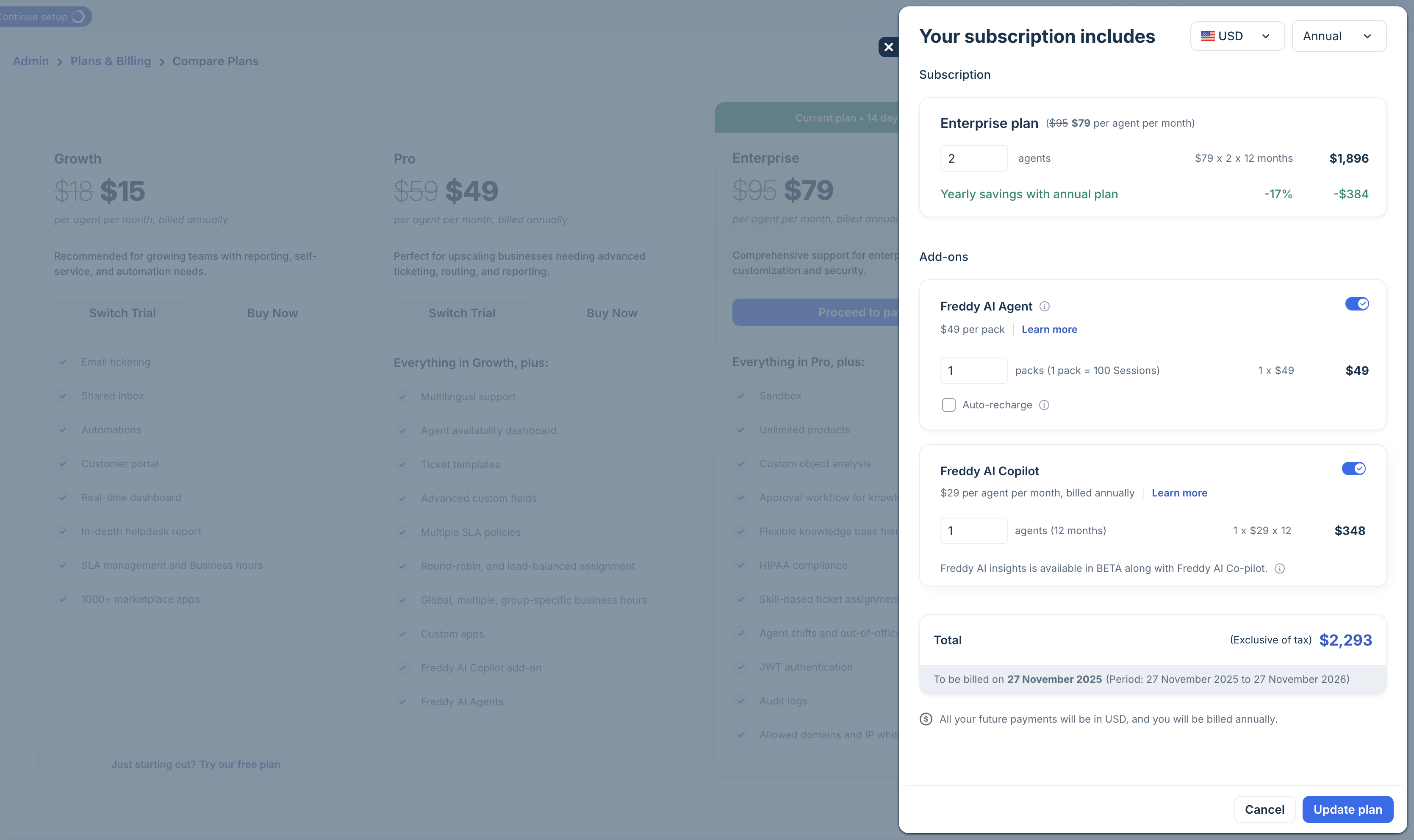
- Log in as an account admin and go to Admin > Plans and Billing.
- Click Manage Subscriptions.
- To purchase Freddy AI Agent add-on:
- Enable Freddy AI
- Enter the number of packs (1 pack = 100 sessions)
- To purchase Freddy AI Copilot add-on:
- Enable Freddy AI Copilot
- Add the number of Copilot agents.
- Review the total cost and click Update plan.
For trial customers:
Trial customers can also purchase Freddy AI Copilot and can access the capabilities from the roles and permissions page.
Assign Freddy AI Copilot role to agents
After purchasing the Freddy AI Copilot add-on, you can assign the Freddy AI Copilot role to agents so they can access the respective features. Roles determine which agents consume Freddy AI Copilot licenses and the capabilities they can use.
You can assign the role to individual agents or perform a bulk action. For more details, see Assign Freddy Roles to Agents.
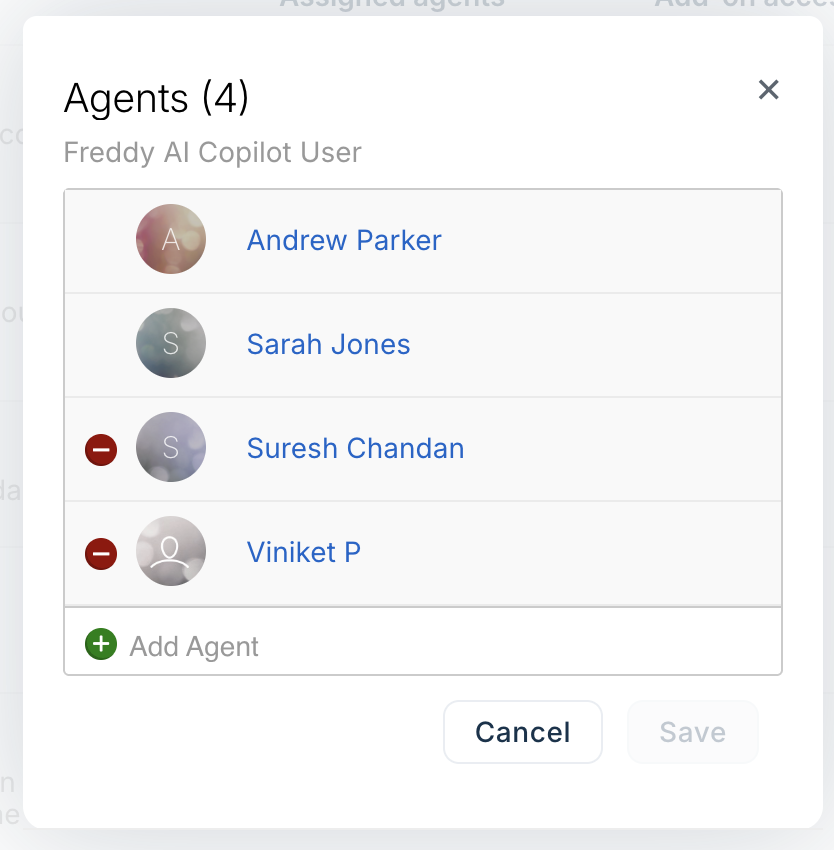
To add the Freddy AI Copilot license to multiple agents:
- Go to Admin > Team > Roles.
- Scroll to Freddy AI Copilot User, hover, and click on Agent under the Assigned Agents column.

- Add agents to assign the role and click Save.
To assign the role to individual agents:
- Go to Admin > Team > Agents.
- Find and Edit Agent.
- Under Settings, click Add roles choose Freddy AI Copilot User.
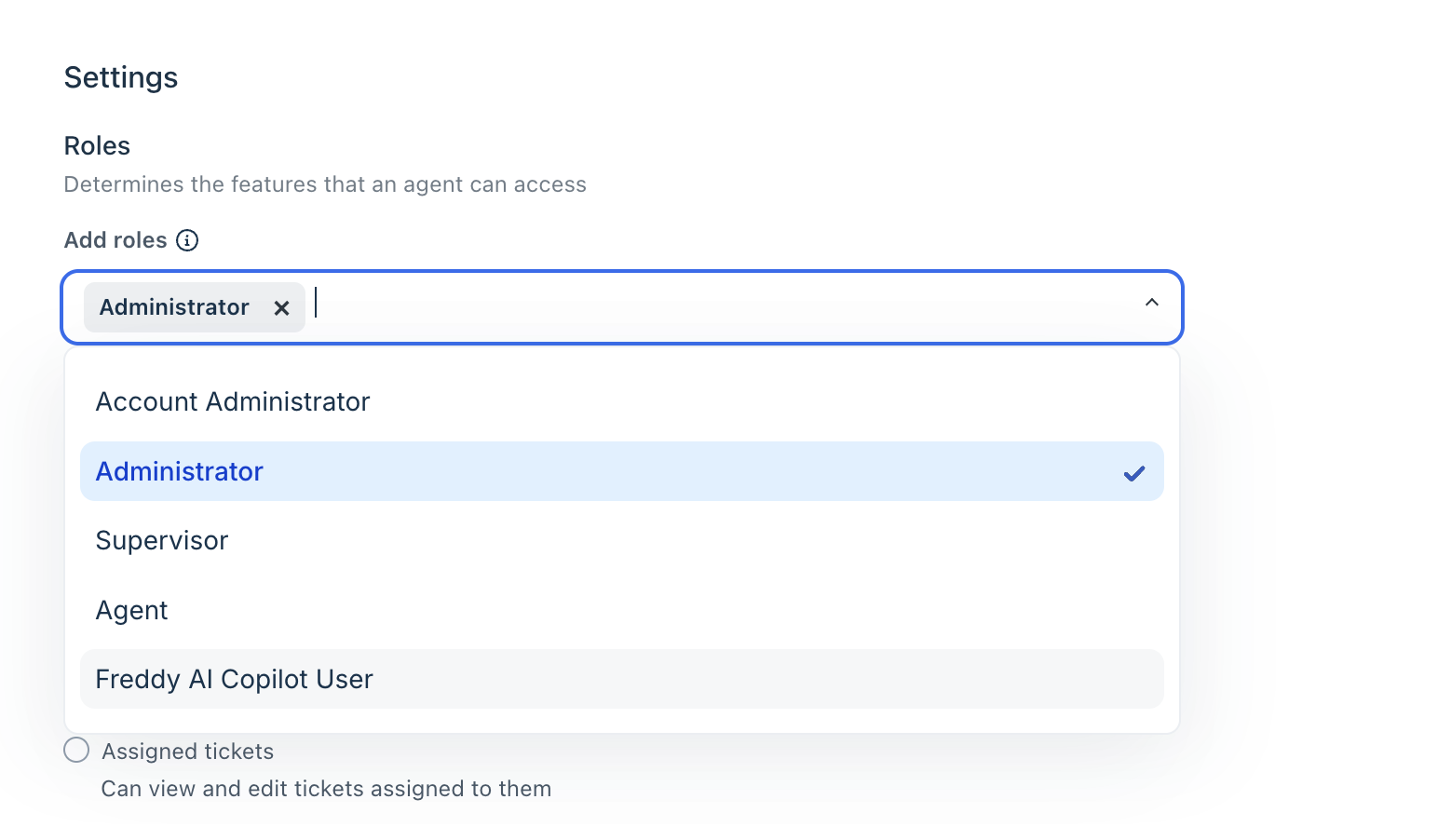
- Click Update Agent.
Auto-recharge Freddy AI Agent Sessions
To prevent service interruption, you can enable auto-recharge for Freddy AI Agent sessions to continue using AI Agent Studio. When your remaining session packs fall below the set threshold (default: 50 sessions), the packs will be automatically added to your account.
- Default auto-recharge volume: 1 pack = 50 sessions
- You can adjust the number of packs or disable this feature at any time.
To enable auto-recharge
- Go to Admin > Account > Plans & Billing.
- Click Manage Subscriptions.
- Enable the Freddy AI Agent add-on.
- Select Auto-recharge.
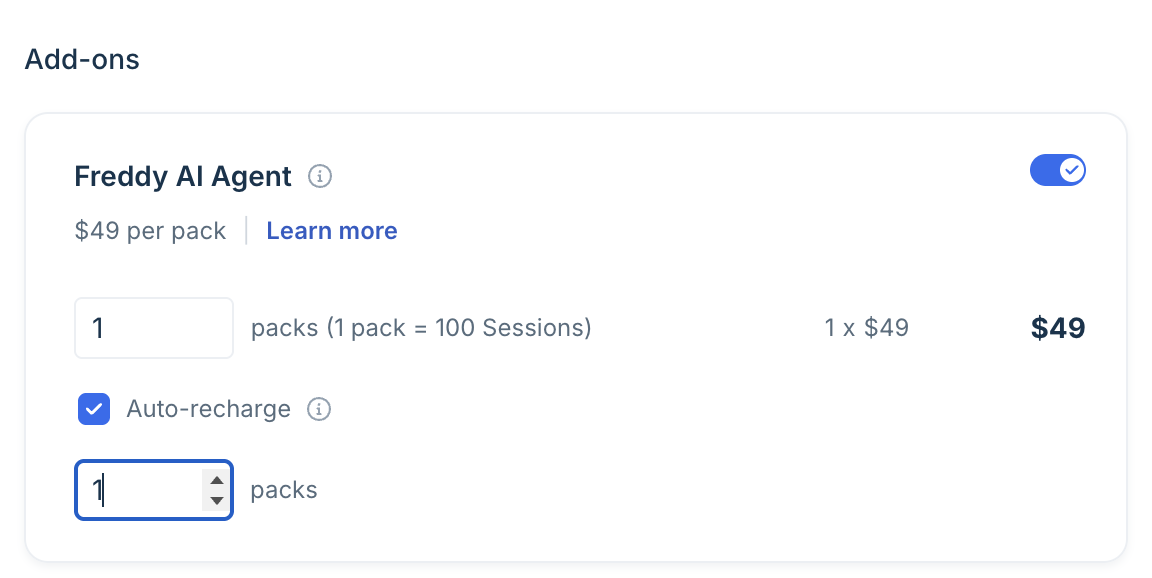
- Enter the number of packs to be auto-recharged.
- Make the payment.
Note: Auto-recharge is available only to customers with online payment methods.