
 Community
 Video Library
 Agent Training
 Freshservice
 Freshdesk
 Freshchat
 Freshcaller
 Freshsales
 Freshteam
 Freshworks Neo
 Freshsurvey
 Growth
TABLE OF CONTENTS
This article explains how to purchase and enable the Voice add-on in Freshdesk Omni, understand its pricing and license requirements, and manage Voice credits.
Prerequisites:
Before you purchase the Voice add-on, ensure that you have account admin privileges.
Overview
The Voice add-on enables the Voice channel in Freshdesk Omni. After you purchase the add-on, your team can use Voice to make and receive customer calls and manage voice conversations as part of your support workflow. For a general overview, see Connect your Voice channel.
The Voice add-on pricing depends on your Freshdesk Omni plan, billing frequency, and currency. Your Voice add-on plan must match your base Freshdesk Omni plan, and the number of Voice add-on licenses must not exceed the number of agent licenses in your base subscription.
For example, if you have the Freshdesk Omni Pro plan with 10 agent licenses, you must purchase the Pro Voice add-on and can get up to 10 Voice add-on licenses.
Note: The prices and subscription details displayed on the Plans and Billing page may vary based on your plan, billing frequency, currency, and subscription configuration.
The following table lists the Voice add-on price by plan, billing frequency, and currency. For complete feature comparison, see Voice add-on feature availability.
Plan | Billing Frequency | USD | EUR | GBP | INR | AUD |
Growth | Annually | 15 | 15 | 12 | 999 | 25 |
Monthly | 18 | 18 | 15 | 1199 | 30 | |
Pro | Annually | 39 | 39 | 29 | 2799 | 55 |
Monthly | 47 | 47 | 35 | 3399 | 66 | |
Enterprise | Annually | 69 | 69 | 55 | 4999 | 99 |
Monthly | 83 | 83 | 66 | 5999 | 119 |
Enable and purchase the Voice add-on
To purchase and enable the Voice add-on, follow these steps:
- Log in to Freshdesk Omni as an account admin.
- Go to Admin > Plans and Billing.
- Click Manage subscription.
- Click the Voice add-on option to enable it.
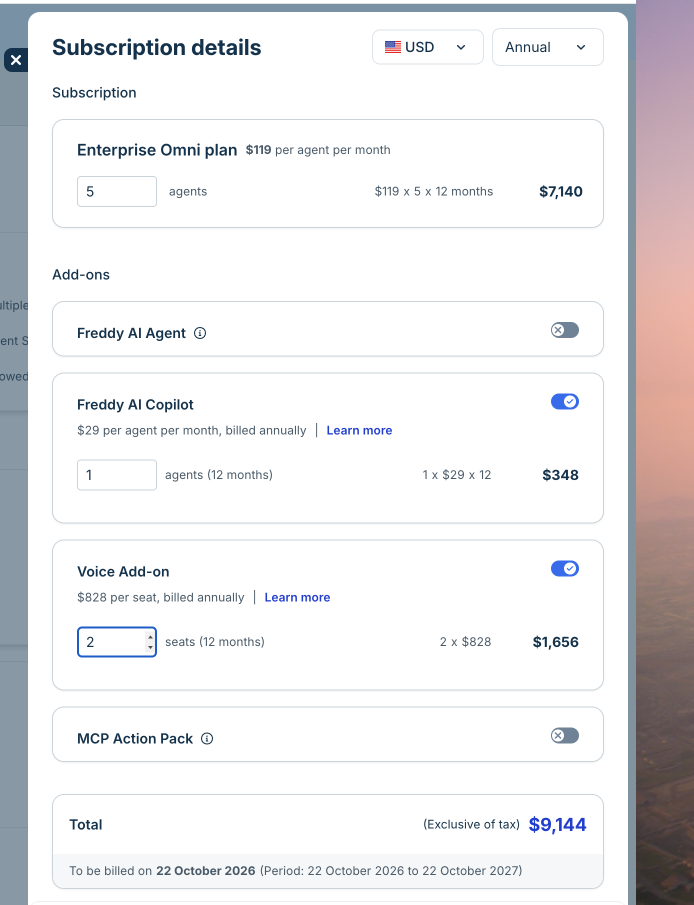
- Enter the number of voice seats. The number must not exceed the number of agent licenses in your base Freshdesk Omni subscription. For example, if your subscription includes 5 agent licenses, you can purchase up to 5 Voice seats. To add more agents and voice seats, see Add support agents.
- Review the subscription details and total cost.
- Click Update plan to complete the purchase.
Purchase Voice credits
Voice credits cover applicable Voice usage, including making and receiving calls and purchasing phone numbers. You can purchase additional credits when your balance is insufficient for your expected usage.
To purchase or recharge Voice credits, follow the instructions in Add or recharge phone credits.
Set up automatic credit recharge
You can enable automatic recharge to replenish Voice credits when your balance reaches a configured threshold. Automatic recharge is disabled by default.
When automatic recharge is enabled, Freshdesk automatically purchases additional credits according to your configured recharge settings when your balance reaches the threshold.
For instructions, see Add or recharge phone credits.
Understand Voice add-on billing
Based on your subscriptions and call usage, you may receive three separate invoices:
Invoice | What it covers |
Freshdesk Omni and Voice add-on subscriptions | Covers your Freshdesk Omni licenses and associated Voice add-on licenses. |
Call credits and usage | Covers pay-as-you-go call charges and phone number purchases. |
Review the invoices to distinguish subscription charges from call usage and phone number purchases.