
 Community
 Video Library
 Agent Training
 Freshservice
 Freshdesk
 Freshchat
 Freshcaller
 Freshsales
 Freshteam
 Freshworks Neo
 Freshsurvey
 Growth
AI Agent sessions are defined as all interactions between an end-user and the AI agent occurring within a 24-hour window. Each session can last up to 24 hours.
You can easily monitor the AI Agent session consumption directly from your Freshdesk account. This helps you stay on top of your usage, manage session limits, and plan for renewals or top-ups as needed.
To view the sessions consumed:
- Log in to your account.
- From the left navigation bar, click AI Agents.
- Click on the Session consumed indicator to see a detailed breakdown of
- Total sessions allocated
- Sessions consumed
- Sessions remaining
- Number of days remaining in the current billing cycle
- To gain deeper insights, click View report to open the Session Usage Summary Report.
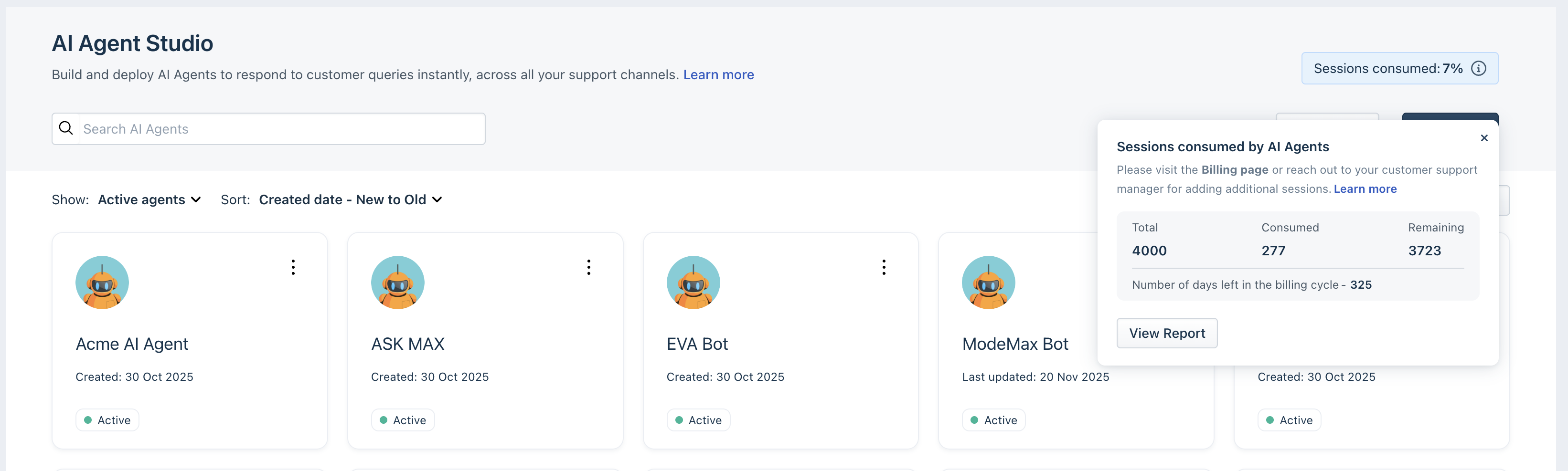 Based on the sessions used, you can purchase additional sessions from the Billing page or contact your customer success manager.
FAQs
- What is an AI Agent session?
A session is defined as all interactions between an end-user and the AI agent occurring within a 24-hour window. Each session can last a maximum of 24 hours. - How do I purchase AI Agent sessions?
You can purchase AI Agent Session packs from your billing page or by reaching out to your Account Manager or Customer Success Manager. Each AI Agent session pack contains 100 sessions and costs $49. When you purchase session packs, they will instantly be added to your account for the current billing cycle. For more details, see Manage Freddy AI Ad-ons. - Will previewing AI agent consume sessions?
You can preview your AI agents as you build them, ensuring a well-crafted customer experience. Please be aware that previewing will consume sessions.
Previewing AI Agents will consume sessions, regardless of whether the AI Agent is published or unpublished. - Are there any complimentary sessions available?
Free: No complementary sessions
Growth, Pro, Enterprise: 500 one-time complementary sessions. - What happens when sessions are exhausted?
You will be notified via email when you consume 70%, 80%, 90%, and 100% of your sessions. If you consume 100% of your sessions, the AI agent will stop responding to customer queries, and chats will be handed over to live agents.
If you have deployed your AI Agent using the self-service widget, please note that the AI Agent will stop working, and it won’t be handed over to a live chat agent. - How can I ensure that Freddy AI Agent sessions are automatically added to my account when the available limit is low?
If your account uses online billing, you can enable the Auto-Recharge feature from your Billing page. This automatically adds one session pack to your account when the number of available sessions drops below 50.
Note: The Auto-Recharge feature is not available for accounts with offline billing. - What happens when my customer starts a session at 11:59 PM, which spills into the next day? Will this be counted as two sessions?
Sessions last for 24 hours. If a customer starts a session at 11:59 PM, it is counted as 1 session till 11.58 PM of the following day. - Are unused sessions carried over to the next cycle?
Unused sessions are not carried over to the next subscription cycle.
For example, if you’re on the quarterly billing cycle and use 2000 out of 3000 sessions in a quarter, the remaining 1000 sessions will not be carried over to the next quarter. - How long is the validity of the sessions that I purchased last?
The validity of the sessions purchased aligns with your payment cycle. For example, if you have a quarterly payment cycle, sessions expire quarterly. - What happens when sessions are added in between the billing cycle?
Sessions are automatically added to the current billing cycle and renewed for the next billing cycle. - Does session pricing change according to the chosen billing cycle (Monthly, Quarterly, Half-yearly, Annual)?
No. The pricing remains the same, regardless of the billing cycle you choose. - How can I keep track of how many sessions are used?
Session utilization details can be found in the Session Usage Summary Report. The number of consumed and available Freddy AI Agent sessions will also be available on your billing page. - How can I increase or decrease the number of session packs that I have?
You can increase or decrease session packs based on your usage or support volume from the Billing or Subscription page, or you can reach out to your Account Manager or Customer Success Manager to have them added to your account.
If you need to add additional session packs, they will be added to the current billing cycle. However, if you choose to remove session packs, they will come into effect only in the next billing cycle. or more details, see Manage Freddy AI Ad-ons. - What is the expiry for session packs?
Session packs expire within the billing cycle in which you purchase them. They are not prorated and do not depend on when you add them. They will continue to be added for subsequent billing cycles to ensure that you don't miss out on your requirements during the next cycle.
You must explicitly reduce the session packs during the next billing cycle to avoid getting charged. - Is there any limitation on how I can use my sessions within the billing cycle?
No. If you’re on the quarterly billing cycle and purchased 300 Freddy AI Agent sessions or 3 Packs, these can be used flexibly across the quarter. For example, you can use 100 sessions in the first month and the remaining 200 over the next two months.